# 11 Common Pi Network KYC Problems & Solutions: From Pending Approval to Wallet Migration
Are you a Pi Network user facing hurdles in the KYC (Know Your Customer) process? Experiencing prolonged pending approvals, Pi coin delivery issues to your wallet after approval, or a locked wallet? You’re not alone.
This article addresses 11 specific KYC problems many Pi Network users encounter, providing reliable, practical solutions for each. Consider this your roadmap to navigating KYC challenges and successfully joining the Pi Network ecosystem and migrating your Pi coins to the mainnet.
## Pi Network KYC: 11 Common Problems and Solutions
Pi Network’s KYC process is crucial for network security and fairness. However, it can be complex, leading to confusion and frustration. Here are 11 frequently reported issues and how to address them:
1. **KYC Application Stuck in ‘Pending Approval’ for Weeks or Months**
“My KYC application has been ‘pending’ for weeks or months.” This is a common concern. Some users report waiting for weeks, months, or even longer.
**Why the Delay?**
* **Community Validator Dependency:** Pi Network’s KYC relies on community validators. Validator availability and regional verification capacity are limited, causing application backlogs.
* **Backlogs:** New user influxes and system updates can create temporary backlogs.
* **Manual Verification:** Some cases require manual review, increasing processing time.
**Solutions:**
* **Avoid Resubmissions/Deletions:** Repeated submissions or deletions can worsen delays.
* **Regular App Updates & Checks:** Keep your Pi Network app updated and check your KYC status regularly.
* **Patience:** Many users report approval after prolonged waiting; it’s likely a processing backlog.
* **Check Official Announcements:** Monitor official channels (in-app notifications, social media) for updates.
This delay usually stems from system backlogs, not user error. Remain calm and patient.
2. **Mainnet Checklist Step 9 Remains Orange After KYC Approval**
Even after KYC approval, Mainnet Checklist Step 9 might remain orange. This can be misleading.
**Why is Step 9 Orange?**
* **Wallet Connection Issues:** Step 9 reflects not only KYC approval but also your Pi wallet’s connection to your Pi Network account. An issue here keeps it orange.
* **Synchronization Delays:** A delay may occur after KYC approval as the system synchronizes information.
**Solutions:**
* **Verify Account Login:** Ensure you’re logged into the correct Pi account if you have multiple accounts.
* **Verify Wallet Connection:** Open Pi Browser to confirm your wallet’s creation and connection to your account. Check if the wallet address matches Steps 3 and 9.
* **Try Re-login:** Logging out and back in may trigger synchronization.
* **Wait:** This usually resolves itself over time.
3. **Pi Coins Not Migrating to Mainnet After KYC Approval**
KYC approval doesn’t automatically migrate Pi coins. It’s a separate, complex process.
**Why the Delay?**
* **KYC and Coin Migration are Separate:** KYC proves your identity; coin migration is a different process.
* **Incomplete Mainnet Checklist:** Complete all Mainnet Checklist steps (wallet creation, passphrase storage, lockup settings).
* **Batch Processing System:** Mainnet migration happens in batches for efficiency.
* **Lockup Period:** Locked Pi coins won’t migrate until the lockup period ends.
**Solutions:**
* **Thoroughly Check the Mainnet Checklist:** Ensure all steps are green, especially Steps 3 (wallet creation) and 9 (wallet verification).
* **Verify Wallet Settings:** Ensure your wallet is correctly set up and your passphrase is securely stored.
* **Wait:** Migration takes time; it may take days or weeks.
* **Update App/Re-login:** Update your app and try re-logging in.
Your Pi coins won’t be lost. It’s likely a delay.
4. **KYC Rejection Due to Name Changes or ID Discrepancies**
Discrepancies between your ID and Pi account name (e.g., marriage name change, spelling differences) frequently cause rejections.
**Why are Discrepancies Problematic?**
* **Strict Automated Checks:** The KYC process uses automated ID scanning and facial recognition; even minor discrepancies trigger rejections.
* **Fraud Prevention:** Strict name matching prevents fraudulent accounts.
**Solutions:**
* **Prepare Official Documentation:** Provide official documents (marriage certificate, etc.) for name changes.
* **Submit Through the KYC Appeal Section:** Use the appeal section, attaching updated ID and proof of name change, with a concise explanation.
* **Update Account Name:** Update your Pi account profile to match your official ID before applying.
* **Avoid Creating New Accounts:** Don’t create a new account; this violates Pi Network policy.
Manual validator appeals have succeeded. Provide clear evidence and be patient.
5. **”Application Limit Reached” Message**
This message indicates temporary resource limitations or congestion.
**Why Can’t You Apply?**
* **Temporary Application Limits:** Pi Network limits concurrent applications for stability.
* **System Maintenance:** Maintenance may temporarily halt applications.
**Solutions:**
* **Try Again Later:** Check back periodically; application slots are regularly updated.
* **Check Official Announcements:** Look for announcements regarding application slots or system maintenance.
This is usually temporary.
6. **Locked or Inaccessible Wallet After KYC Approval**
This prevents Pi coin access and transfers.
**Why is the Wallet Locked?**
* **Synchronization Issues:** There may be delays or issues between the KYC and wallet systems.
* **Security Measures:** Suspicious activity may temporarily restrict wallet functionality.
**Solutions:**
* **Check Pi Browser:** Ensure Pi Browser is updated and launched correctly from the Pi app.
* **Reload Wallet:** Reload the wallet page in Pi Browser or restart the browser app.
* **Restart Your Device:** Restart your smartphone or PC.
* **Wait:** If issues persist, wait a few hours or a day.
7. **Repeated “Upload Errors” When Submitting Documents**
This prevents document uploads.
**Why Upload Errors?**
* **Unstable Network Connection:** Unstable Wi-Fi or mobile data leads to upload errors.
* **File Format/Size Issues:** Unsupported file formats or oversized images cause errors.
* **Server Load:** High server load may cause delays or errors.
**Solutions:**
* **Stable Network:** Use a stable Wi-Fi connection.
* **Check Image Files:** Use supported formats (JPEG, PNG) and appropriate sizes; resize if needed.
* **Restart App/Change Device:** Restart the Pi app or try a different device.
* **Change Time of Day:** Try applying during off-peak hours.
8. **Mismatched Wallet Addresses in Mainnet Checklist Steps 3 and 9**
This impacts Pi coin migration.
**Why the Mismatch?**
* **Incorrect Wallet Connection:** This happens with multiple wallets or when using a different wallet than the one linked to your account.
* **System Display Bug:** A rare possibility is a temporary display issue or synchronization delay.
**Solutions:**
* **Verify Wallet Address:** Carefully compare the wallet address in Pi Browser with the addresses in Steps 3 and 9.
* **Verify Correct Wallet Connection:** Ensure the correct wallet is linked to your Pi Network account.
* **Contact Official Support:** If problems persist, report the issue to Pi Network’s official support.
9. **Disabled Transfer Function After KYC Approval**
KYC approval doesn’t mean immediate transfer capability. Further conditions must be met.
**Why is the Transfer Function Unavailable?**
* **Ongoing Mainnet Migration:** The transfer function becomes active upon full mainnet migration.
* **Batch Processing Delays:** Your Pi coins may not yet be “available” due to batch processing.
* **Lockup Period:** You can’t transfer locked Pi coins.
**Solutions:**
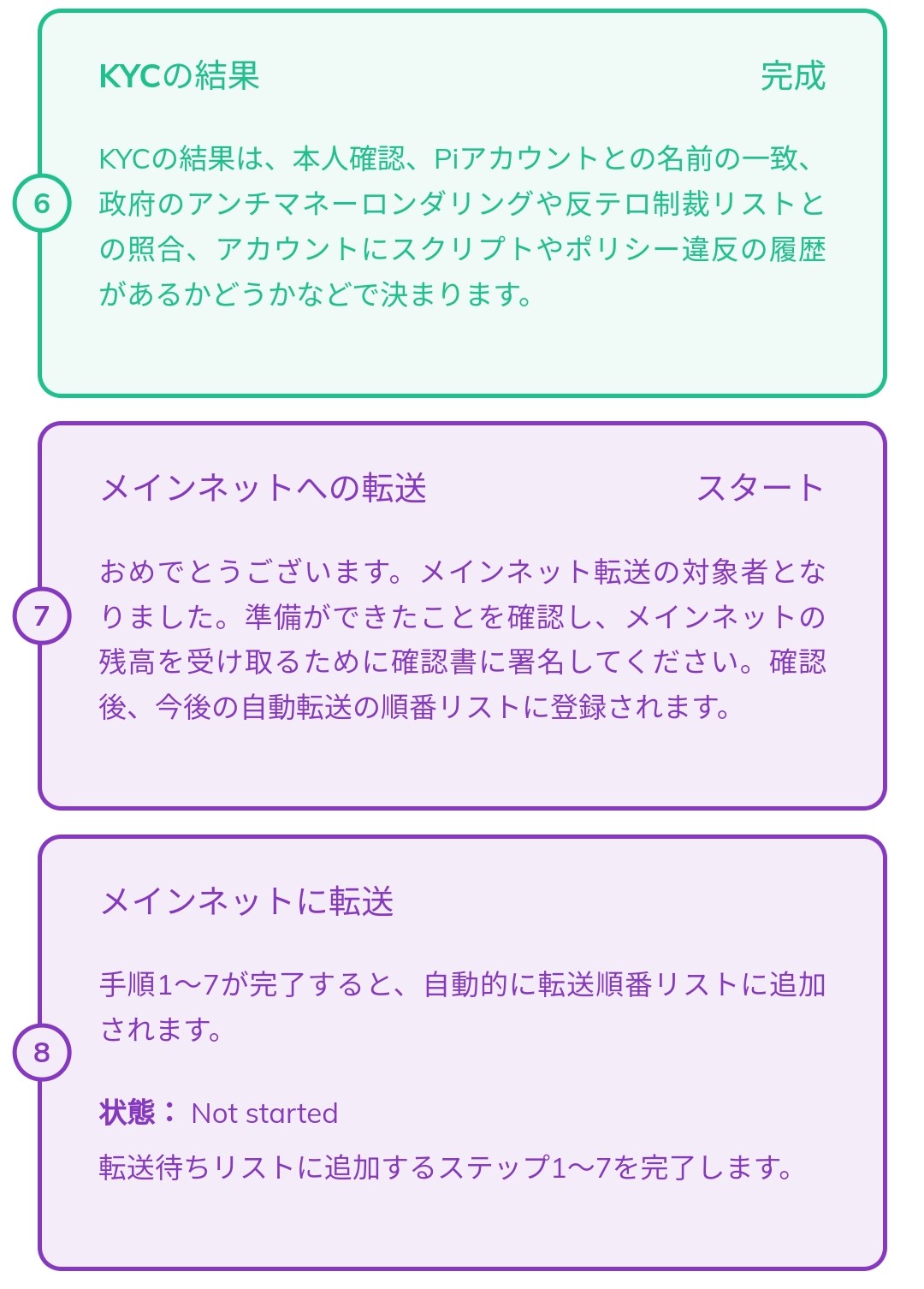
* **Final Mainnet Checklist Check:** Verify all steps are completed (especially Steps 7 and 8 related to mainnet migration).
* **Verify Pi Coins in Wallet:** Check your Pi Browser wallet for available Pi coin balance.
* **Wait:** Many functions are available only after complete mainnet migration.
The source suggests the function isn’t actually disabled; it’s likely a misunderstanding or a temporary unavailability.
10. **Lost or Returned Pi Coins After KYC Completion**
This is a panic-inducing situation.
**Why the Apparent Loss?**
* **Temporary Display Issues:** Wallet synchronization issues or app bugs may cause incorrect balance displays.
* **Incorrect Wallet Address:** You might be referencing the wrong wallet or confusing multiple wallets.
* **System Processing:** In rare cases, coins may be temporarily held or returned to a specific wallet due to issues like fraud detection, but this is extremely rare.
**Solutions:**
* **Re-verify Wallet Address:** Check your Pi wallet’s address in Pi Browser and its transaction history.
* **Restart the Pi Network App:** A restart might resolve display issues.
* **Check Pi Network Official Announcements:** Check for information on large-scale system changes or known bugs.
* **Contact Official Support:** Contact Pi Network support if problems persist.
Your Pi coins are unlikely to be permanently lost after KYC completion. It is most often a temporary display issue or a temporary state during system processing.
11. **KYC Completed on the Wrong Pi Account**
Completing KYC on the wrong account leaves your intended wallet empty.
**Why is the Wallet Empty?**
* **Account/Wallet Mismatch:** The KYC-completed account doesn’t match the account holding your Pi coins.
* **Multiple Account KYC Attempts:** Pi Network policy generally allows one account per person. Attempting KYC on multiple accounts can cause issues.
**Solutions:**
* **Identify the KYC-Completed Account:** Pinpoint the account where KYC was completed.
* **Verify Wallet Link:** Check if the wallet linked to the KYC-completed account matches your Pi coin holding wallet.
* **Understanding the Truth:** An empty wallet likely means you’re using the wrong account’s wallet. Multiple account KYC attempts are problematic.
To avoid this, verify your account and wallet linkage and ensure you are using only your primary account before KYC.
## Conclusion: Patience and the Right Approach are Key to Pi Network KYC Success
Pi Network’s KYC process presents unique challenges due to its decentralized and community-driven nature. Many issues resolve through understanding the system and patience. By addressing the problems described here, you can ensure secure Pi Network use and smooth Pi coin migration to the mainnet. Act calmly, using accurate information; this is the surest path to full participation in the Pi Network ecosystem.
## Further Exploration of Pi Network: Using Reliable Information Sources
Information about Pi Network’s KYC and ecosystem is constantly updated. This article aims to help resolve your issues. For more details or the latest guidelines, consult Pi Network’s official website, official announcements, trustworthy community guidelines, and in-depth explanations from experts.