Introducing an app that allows you to mine the virtual currency Pi Network (Pi Network) on your smartphone.
Introduction
When you hear about cryptocurrency mining, you might imagine needing a high-spec computer running all day just to make a profit. However, this mining introduces a virtual currency that can be mined solely on a smartphone. Even though you’re mining on your smartphone, it doesn’t consume battery; you can mine simply by launching the app once a day and tapping the mining button. To put it simply, it’s like a login bonus in a game. I learned about the Pi Network app around January 2021 and have been repeating the mining operation almost every day, and I’m close to accumulating 10,000 coins.
Since you only have one chance to mine per day, the sooner you start mining, the more coins you can get. So, starting early is the key to accumulating more.
Simple Mining Process (Detailed version described next)
1. Install the app on your smartphone and complete the initial registration.
https://minepi.com/
Please enter the invitation code FOX0326, which is required for initial registration.
(Note)
Identity verification is required, so please be sure to enter your real name when registering for the app.
If the name you registered differs from your identification document during the identity verification process, you will not be able to complete the registration, and all the coins you have accumulated so far will be wasted.
2. Receive mining rewards once every 24 hours.
(Launch the app and tap the button to receive rewards)
That’s all there is to it.
Once you have registered, it’s just a repetition of the operation to receive mining rewards every day. This is similar to the feeling of receiving login rewards in a social game.
What is Pi Network?
It is a virtual currency created in 2019, making it a relatively new cryptocurrency. This virtual currency was created with the idea of allowing many people to obtain virtual currency using only a smartphone, without needing a high-performance PC. It enables mining with just a smartphone and has a system where you can earn rewards with just one tap per day. Currently, 60 million users worldwide are participating in mining and earning rewards.
In the future, there is a plan to exchange Pi coins obtained through mining for goods. It is expected that the coin will be listed, and you will be able to sell the coins you have mined so far, but it is impossible to predict how the price of the coin, which has been mined by many people around the world, will be determined. Some countries predict the value of the coin to be around 100 to 1000 dollars, while others calmly predict that it will not even reach 1 dollar per coin. If coins are to be exchanged for goods, the value of the coin must be fixed, otherwise it will be inconvenient to use, so there is also a movement to decide on a consensus price before using the coin. The Pi Network had 12 million users three years ago, which has increased to 60 million, so the more users there are, the higher the expectation and attention towards the coin.
(The latest number of active users, 60 million, was released on June 28, 2024)
What is the value of Pi Coin?
Currently, Pi Network coins are not officially listed and have no value (0 yen).
However, at the end of 2022, a famous exchange with one of the world’s highest trading volumes suddenly listed it unofficially in the form of IOU (futures trading). At that time, the first price it reached was close to 40,000 yen per coin. The unofficial IOU listing surprised users and caused a bit of a stir.
Trading is still possible, but the price is currently hovering around 7,000 yen per coin.
It is unknown what the price will be when it is actually listed, but the fact that it has such a price in futures trading suggests there is a lot of expectation.
Assuming you could buy and sell at an IOU price of 7,000 yen per coin, based on the current mining rate,
you could mine 0.29 coins per day = 2100 yen.
Although it is an unofficial listing, it serves as encouragement for daily mining, and calculating the number of coins you hold and their value makes things more enjoyable.
How to Start Pi Coin Mining You can start mining in 5 minutes.
① Download the app
You can download the app from the official website.
https://minepi.com/
Clicking the link above will display the app download screen.
Download the app that matches the device you are using (iOS/Android).

(Please be sure to download from the URL above.)
② Initial Registration
After downloading and launching the app, enter your phone number.
The image below asks you to set either your phone number or Facebook.
You can choose either, but entering your phone number below is recommended.
(Phone number verification is required because one person cannot create multiple accounts.)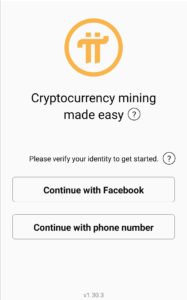
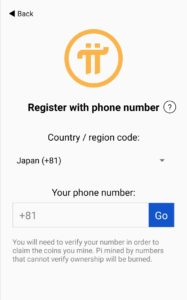
Since it’s a Japanese phone number, select Japan (+81).
Enter your phone number without the leading 0 and tap Go.
(Example: If your number is 090-1234-5678, enter 9012345678)
③ Account Settings
Enter your first and last name. Please be sure to enter your real name. If you register without your real name, it will not match your identification document during identity verification, and you will not be able to obtain the mined currency.
You can enter any name you like for your username.
④ About Your Referrer
You cannot complete the initial registration without an invitation code.
If you like, please enter my code FOX0326 to register.
By entering the invitation code, you can receive 1 coin.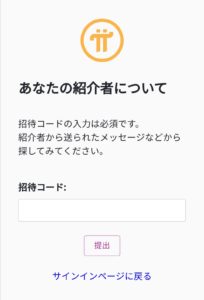
⑤ Password Setting
Set the app password.
Please create a password that meets the conditions displayed on the screen.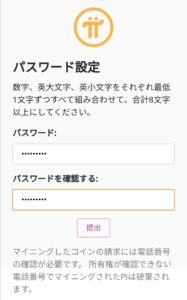
This completes the account issuance.
Good job!
About Mining Operations
Simply launch the app every 24 hours and tap the mining button. If you forget to tap, a mining gap will occur, and you will not receive the coins you would have earned during that gap.
(This operation is so monotonous that you might forget you have the app installed. Setting a daily timer might help prevent forgetting.)
Benefits of Mining Now
It is advantageous to start mining early. The Pi Network system employs a method that decreases the number of coins obtainable each month. Since the amount mined decreases at the beginning of each month, users who start early have an advantage in obtaining more coins.
Mining speed per hour
Currently → 0.02 coins per hour
Mining for one day at the current speed… 0.48 coins
Mining for one month (30 days)… 14.4 coins
This is the amount.
Therefore, now is the chance to efficiently obtain virtual currency. The start of the mainnet will see a decrease as the phase progresses, so it is advantageous for those who want to receive efficiently to start early.
How to View the App’s Home Screen

① → Open the app settings screen
You can view your profile and information about the app.
You don’t use it often, only when necessary.
② → Current number of accumulated coins
The total number of coins you have accumulated so far is displayed.
③ → Place for users to chat
This is a place where Japanese people can talk about Pi and ask questions.
If you have any problems, it’s a good place to ask.
Be careful as you will be banned from posting if you don’t use it with good manners.
④ → Screen for setting up the Security Circle
This is the screen for adding trusted invitees and setting up the Security Circle.
Details about the Security Circle are described later in the article.
⑤ → Number of invitees Current number of miners / number of invitees
The number of people you have invited is displayed.
Having a large number here is advantageous for mining.
⑥ → Mining amount per hour
The amount you can mine per hour is displayed, calculated from your original mining capacity and the mining bonus from invitees. If the invitees in ⑤ neglect mining, your mining amount will decrease.
About Initial Setup
After issuing an account with the app, there are several initial registrations that require operation.
Initial registration is required after completing the app account creation.
From the menu opened by tapping the three lines in the upper left corner of the home screen, tap Profile.
The necessary screen for settings will appear.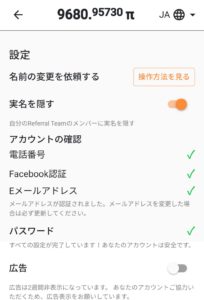
・Phone number verification
→ Perform phone number verification to link your phone number and account.
Enter your phone number and perform SMS verification.
There is a screen to select a country, but Japan is not listed.
Select an appropriate country and proceed with the operation.
It may not register on the first try, so try again after some time.
(Receiving SMS may incur charges, so do not try repeatedly if registration fails.)
・Profile settings
→ Register your name. Identity verification will be performed, so please be sure to register using your real name.
After registering, hide your real name using the hide button. If you don’t hide it, your name will be revealed to your invitees.
・Facebook verification
→ Verification is optional. It is a good idea to link it to your account in case of emergencies.
・Wallet creation
→ Create a wallet to store Pi Network coins.
Be sure to write down the password displayed when creating the wallet.
Losing it is equivalent to losing your coins.
Once the initial registration is complete, all you have to do is continue mining daily.
It’s a monotonous task, but the day may come when you are grateful for repeating this monotonous task when it gains significant value in the future.
What is the current value of the virtual currency?
Currently, this virtual currency is not listed, so its value is 0 yen.
You can only mine; you cannot exchange it for other currencies or send virtual currency.
According to the white paper on the official website, it is currently in Phase 3,
which is a testing phase. There are three phases, and identity verification will be performed when Phase 3 is reached,
allowing you to send and trade for the first time. Why not try getting this virtual currency for free, believing that you will receive it in the future? If you register with the code mentioned above, you will definitely receive 1 coin.
About Identity Verification
Currently, identity verification is being carried out sequentially using a completely random method.
The process is such that identity verification is possible in the order that notifications are received from the Pi Network app.
Identity verification seems to be done using My Number Card, driver’s license, or passport.
About the State of Phase 3
Currently, it is in Phase 3. What can be done with just a smartphone is limited to the 24-hour mining operation or earning bonuses using the Pi Browser app.
How to Increase Mining Amount
Even if you mine diligently by yourself, the maximum number of coins you can increase in a month is limited.
Here are some ways to increase your mining amount besides mining alone.
① Increase Pi Network Referrals
If people join using your invitation code to mine, you can set up a Security Circle and increase your mining speed as a reward.
Security Circle 5 people x 20%
Set up a Security Circle with the users you invited. (Please set up with trusted individuals.)
You can set it up from the shield-like icon, the second one from the top on the home screen.
Referral bonus Participants x 0.25
When the people you invite start mining, you will receive a bonus. If the person you invited does not continue mining every 24 hours, you will not receive the bonus. It becomes meaningless if you invite someone but they don’t continue. For inactive users, you can send them a notification to encourage them to mine. (Conversely, if you are neglecting mining, you will also receive a notification.)
② Earn Utility Bonus Around 0.35 Pi Depending on Contribution
Users who contribute to the Pi Network can earn a utility bonus. You can get some Pi coins by participating in the official app’s chat, participating in Pi games, etc. To earn bonuses, please download and use the separate app “PiBROWSER” provided by Pi Network.
③ Earn Node Bonus Around 6.4 Pi per day (Increases gradually with continuation)
Install the Pi app on your PC and operate a Pi Node that monitors Pi transactions. You can earn Pi coins as an operating reward. Operating it simply means keeping the PC running with the app launched for 24 hours. Setting it up has a high hurdle and is difficult without a certain level of network knowledge.
Even when operating a node, the 24-hour mining operation is still required.
What is needed for node operation
An environment with a stable internet connection 24 hours a day
1 PC A PC equipped with a high-performance CPU seems to yield higher rewards. It seems you can get around 8 Pi.
Electricity cost (depends on PC performance)
→ Details about node operation are here. Please refer to this.
How to Operate a PiNode (Explanation of Initial Setup, etc.)
Regarding other content, I will update the article little by little, so please look forward to it.