QR codes」タグアーカイブ

How to Generate QR Codes and Send Funds on Pi Network

Pi Network is an innovative project that allows you to easily mine the cryptocurrency called Pi with your smartphone. To join the Pi Network, you need an invitation from an existing member. If you haven’t started yet, you can download the Pi app from here. In the Pi Network, you can use QR codes to send and receive Pi and verify identity. This article explains how Pi Network’s QR codes work and how to use them.

How to Generate Pi Network QR Codes

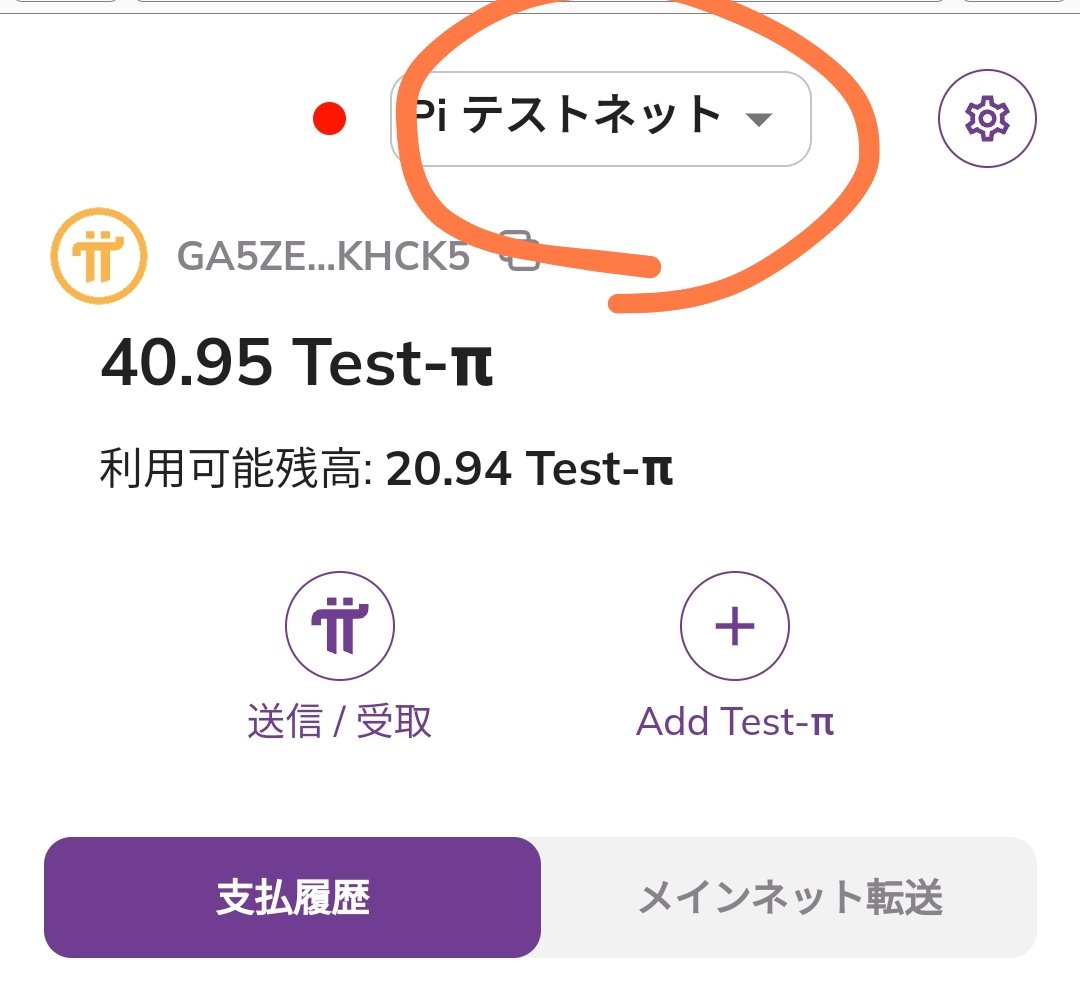
You can generate your Pi Network QR code from the “Wallet” in the Pi app. When you access the wallet, a menu will appear.

Initially, it shows Testnet, but tap the circle part to switch to Mainnet.
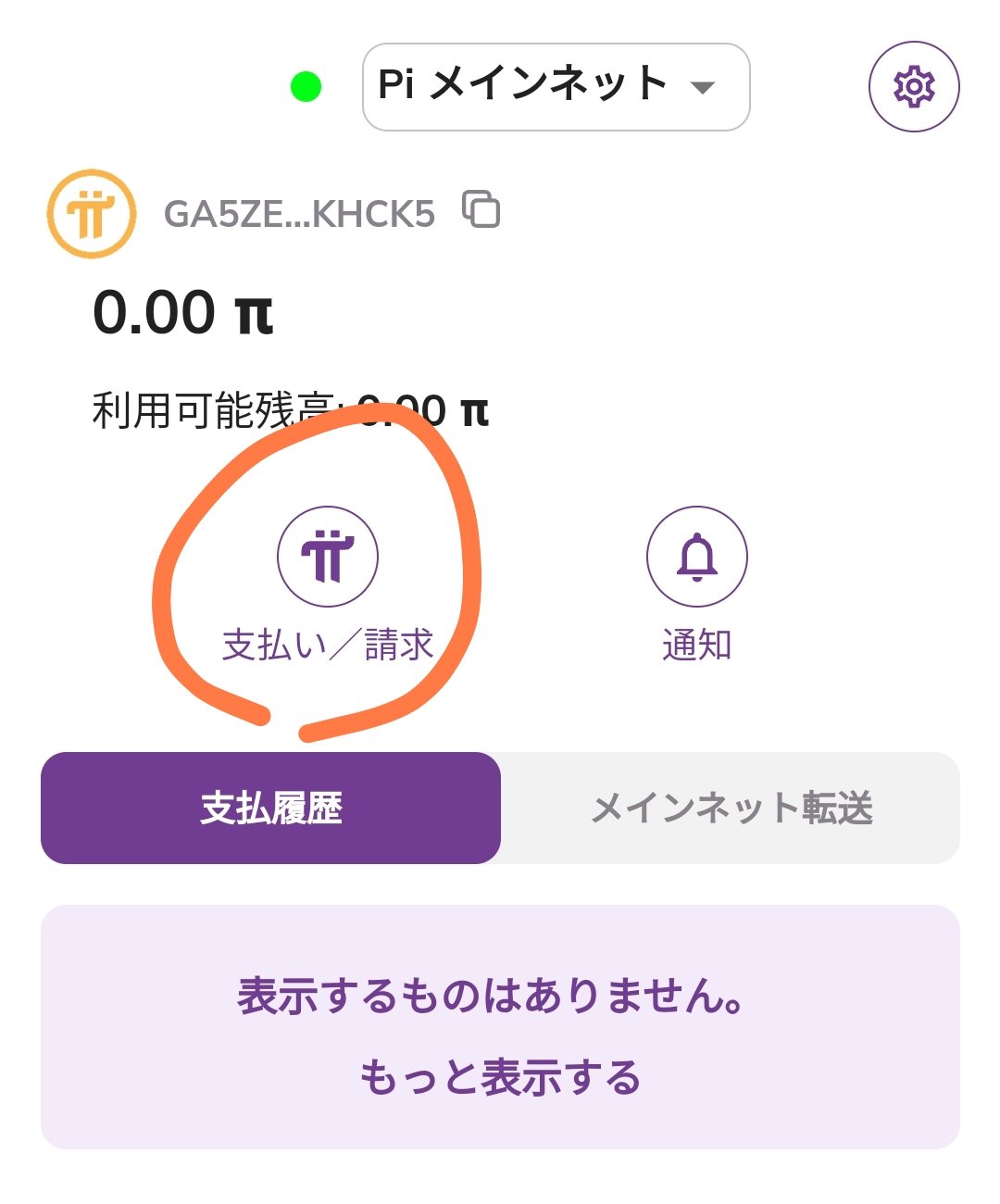
When you switch to Mainnet, you will see the Pay/Request menu.
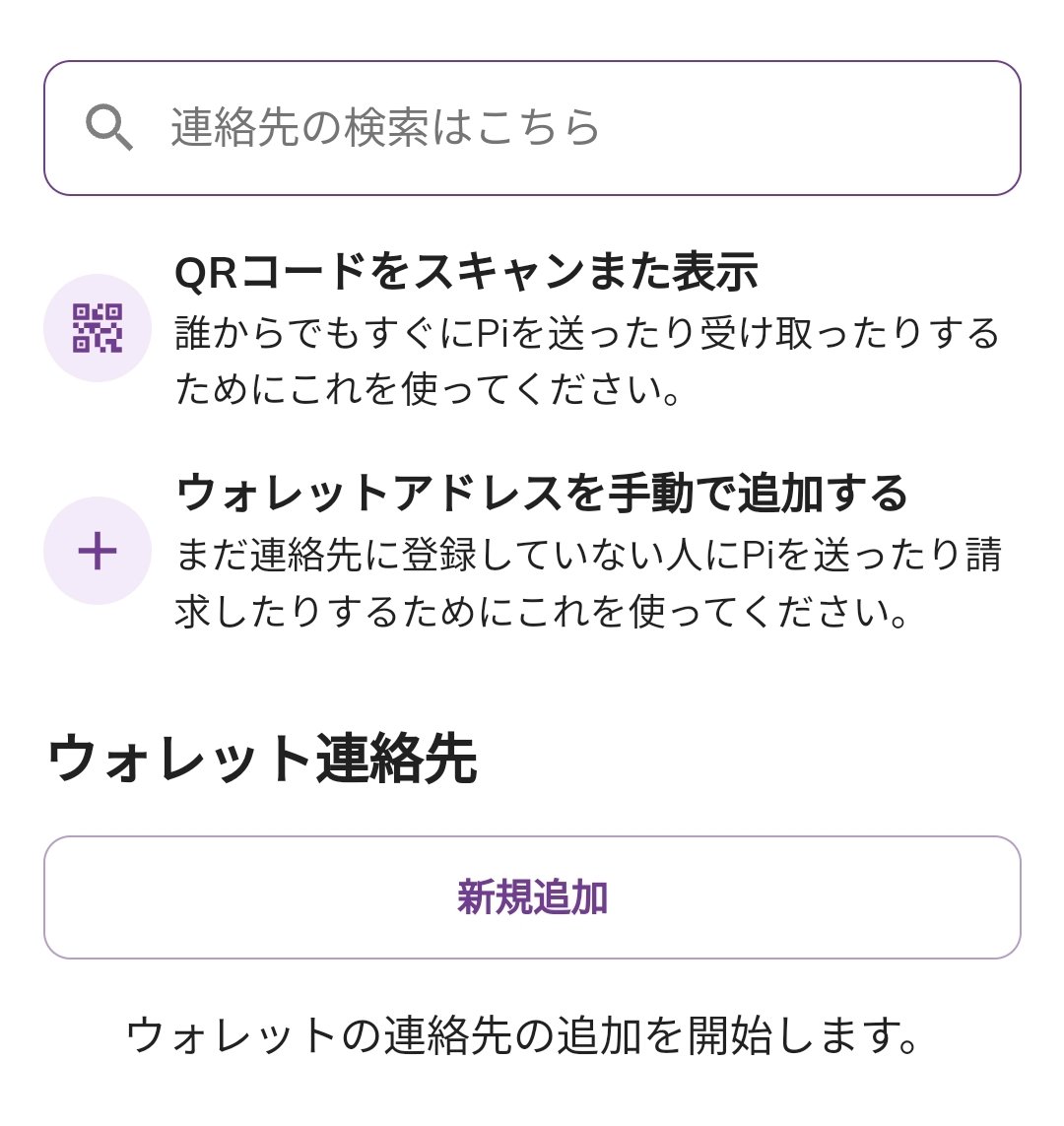
There are also functions to scan someone’s code or add contacts.
When receiving, show your code to the other person.
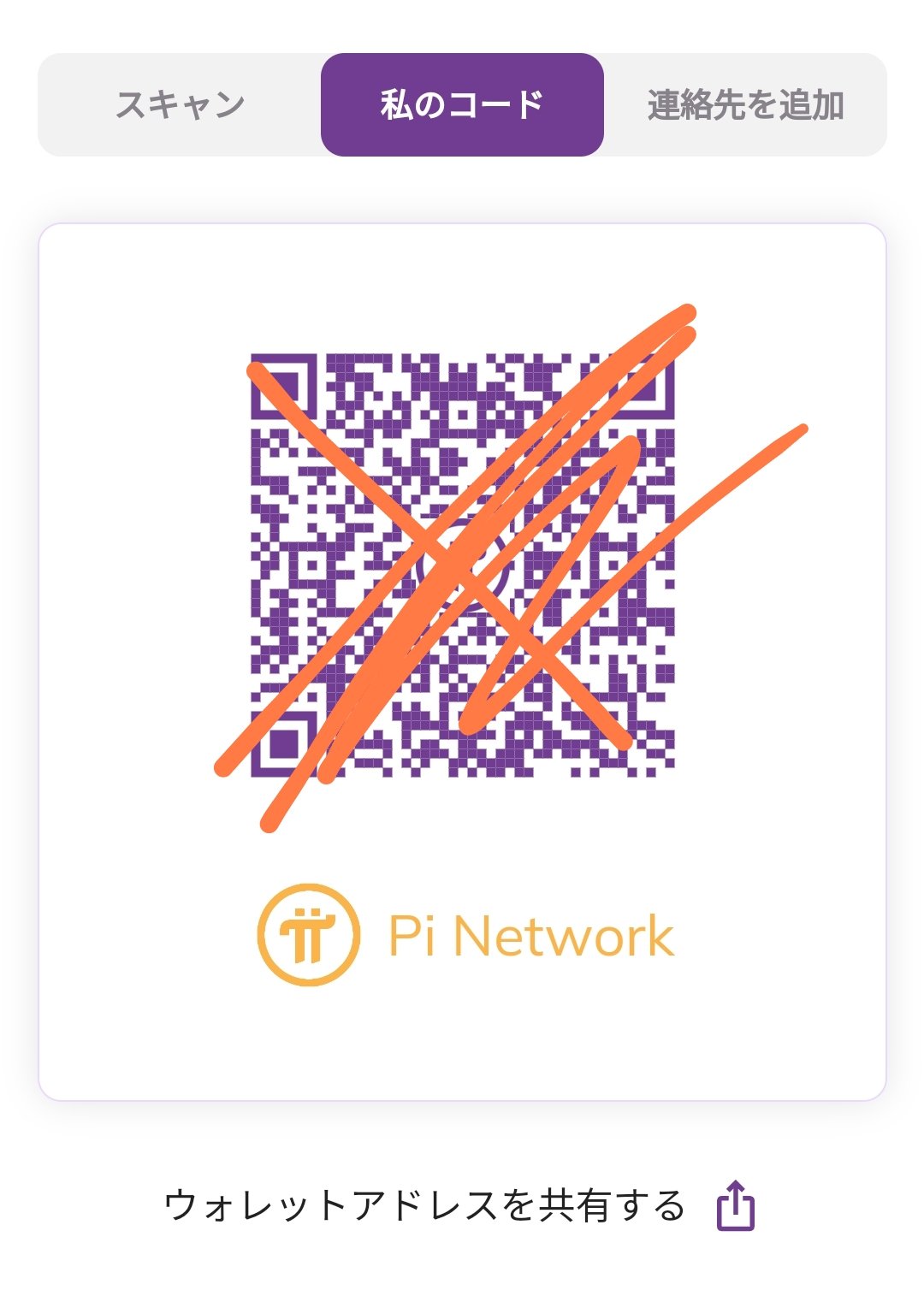
A QR code is a type of two-dimensional barcode that can store various information. The Pi Network QR code contains information about the user’s Pi account. This information includes the user’s nickname, icon, public key, address, etc. The public key and address are necessary for sending and receiving Pi and verifying identity. By scanning the QR code, you can access the user’s profile page. On the profile page, you can check the user’s Pi balance, transaction history, trust network, and more.

How to Send and Receive Pi using Pi Network QR Codes

Pi Network QR codes can also be used to send and receive Pi. To send Pi, scan the recipient’s QR code and enter the amount and a memo. The amount must be entered according to the number of decimal places for Pi. The memo can be used to describe the purpose or content of the transaction. Once you confirm the send, the transaction is sent to the blockchain. To receive Pi, show your QR code to the sender and have them scan it. Once the sender enters the amount and memo and confirms the send, the transaction is sent to the blockchain. Sending and receiving transactions take a few minutes to be confirmed on the blockchain. You can check the status of your transactions in the “Wallet” tab of the Pi app.

How to Verify Identity using Pi Network QR Codes

Pi Network QR codes can also be used for identity verification. You can verify your own identity by scanning your QR code from the “Settings” tab in the Pi app. Identity verification is necessary to prove that your Pi account is genuine. Once your identity is verified, a “Verified” badge will appear on your Pi account. You can also verify the identity of other users by scanning their QR codes. Once their identity is verified, a “Verified by you” badge will appear on their profile page. Identity verification is important for increasing the reliability and security of Pi. Users who have verified their identity have an advantage in building their trust network and using Web3 applications.

Future Outlook for Pi Network QR Codes

Pi Network QR codes are expected to be usable with Pi’s Web3 applications in the future. Web3 applications are a new form of the internet that utilizes blockchain and decentralized networks. Pi Network aims to enable integration and authentication with Web3 applications using QR codes. For example, by scanning a Pi QR code, you might be able to log in to a Web3 application, pay with Pi, or receive Pi. Web3 applications play an important role in expanding the Pi ecosystem and increasing the value of Pi.

Source

https://minepi.com/blog/qr-code/

How to Generate QR Codes and Send Funds in PiNetwork

PiNetwork is an innovative project that allows you to easily mine the cryptocurrency called Pi using your smartphone. To join Pi Network, you need an invitation from an existing member. If you haven’t started yet, you can download the Pi app from here. In Pi Network, you can use QR codes to send and receive Pi and verify identity. This article explains how Pi Network’s QR codes work and how to use them.

How to Generate Pi Network QR Codes

You can generate your Pi Network QR code from the ‘Wallet’ in the Pi app. When you access the wallet, a menu will appear.

Initially, it shows Testnet, but press the circle part to switch to Mainnet.

When you switch to Mainnet, you will see the Pay/Request menu.

There are also functions to scan the other person’s code or add contacts.

When receiving, show your code to the other person.

A QR code is a type of two-dimensional barcode that can store various information. The Pi Network QR code contains information about the user’s Pi account. This information includes the user’s nickname, icon, public key, address, etc. The public key and address are necessary for sending and receiving Pi and verifying identity. By scanning the QR code, you can access the user’s profile page. On the profile page, you can check the user’s Pi balance, transaction history, trust network, and more.

How to Send and Receive Pi Using Pi Network QR Codes

Pi Network QR codes can also be used for sending and receiving Pi. To send Pi, scan the recipient’s QR code and enter the amount and a memo. The amount must be entered according to the decimal places of Pi. The memo can be used to describe the purpose or content of the transaction. After confirming the send, the transaction is sent to the blockchain. To receive Pi, show your QR code to the sender and have them scan it. After the sender enters the amount and memo and confirms the send, the transaction is sent to the blockchain. Sending and receiving takes a few minutes to be confirmed on the blockchain. You can check the status of transactions in the ‘Wallet’ tab of the Pi app.

How to Verify Identity Using Pi Network QR Codes

Pi Network QR codes can also be used for identity verification. You can verify your own identity by scanning your QR code from the ‘Settings’ tab in the Pi app. Identity verification is necessary to prove that your Pi account is genuine. Once your identity is verified, a ‘Verified’ badge will appear on your Pi account. You can also verify the identity of other users by scanning their QR codes. When you verify someone’s identity, a ‘Verified by you’ badge will appear on their profile page. Identity verification is important for increasing the reliability and security of Pi. Users who have verified their identity have an advantage in building their trust network and using Web3 applications.

Future Outlook for Pi Network QR Codes

Pi Network QR codes are expected to be usable with Pi’s Web3 applications in the future. Web3 applications are a new form of the internet that utilizes blockchain and decentralized networks. Pi Network aims to enable integration and authentication with Web3 applications using QR codes. For example, by scanning a Pi QR code, you might be able to log in to a Web3 application, pay with Pi, or receive Pi. Web3 applications play an important role in expanding the Pi ecosystem and increasing the value of Pi.

Source

https://minepi.com/blog/qr-code/