After performing the daily Pi Network mining operation, ads are automatically displayed, but you can hide them in the settings. Displaying ads earns advertising revenue for the operators, which helps support their activities, but for those using low-cost smartphones, displaying ads daily consumes valuable data.
How to turn off ad display
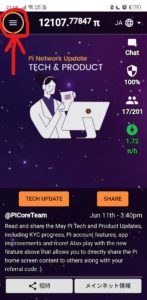
Launch the app and click the three lines (hamburger menu) in the upper left corner.
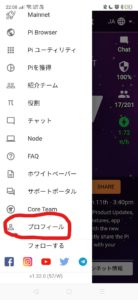
Open the menu and click on Profile displayed at the bottom.
There is an ad section below the profile screen.
Just toggle the switch here, and the setting is complete.
Ads will no longer appear from the next mining operation.

(The image shows the ad display is ON.)